
All categories


A custom mortgage calculator is an interactive tool on your website that calculates mortgage payments using your specific loan products. It lets banks, brokers, credit unions, and fintechs deliver branded calculations to site visitors while capturing leads at the same time.
Unlike a generic third-party widget, a custom calculator gives you control over the inputs (loan amount, down payment, interest rate, property tax, homeowner's insurance, PMI, credit score), the outputs (monthly mortgage payment, total cost over the loan term, amortization schedule, APR), and how leads flow into your CRM.
For lenders and finance professionals, the right tool does three things at once. It qualifies prospects before they reach a loan officer. It generates organic leads from search traffic. And it differentiates your brand from competitors using off-the-shelf widgets.
This guide covers what a custom calculator is, why it outperforms generic widgets for lead generation, what features matter, and how Rabobank built theirs in three weeks using Convert_.
KEY TAKEAWAYS
A custom calculator is a branded, interactive web tool that handles your specific loan products, rates, and pricing logic. Generic widgets only handle basic math.
The right tool captures loan amount, down payment, interest rate, property tax, PMI, homeowner's insurance, and credit score, and returns the monthly mortgage payment, total cost, and amortization on the spot.
Custom calculators reduce loan officer workload by pre-qualifying prospects before any phone call.
Rabobank built a custom calculator on Convert_ in three weeks with no developer involvement and went to market 80% faster than a traditional build.
A high-performing build handles fixed-rate mortgages, adjustable-rate mortgages, refinancing, VA loans, jumbo loans, and home loan refinance scenarios.
Compliance is non-negotiable: the tool needs to align with NMLS, ADA, and applicable data privacy rules (GDPR, CCPA, SOC2).
What is a custom mortgage calculator?
A custom mortgage calculator is a branded, interactive tool that runs on your website and calculates mortgage payments based on your specific loan products, rates, and qualification rules. The tool collects the exact inputs your loan officers need and routes the resulting lead directly into your CRM or origination system.
The core functions a custom calculator should include:
Loan amount and home purchase price
Down payment percentage or dollar amount
Interest rate, with separate rate paths for fixed-rate loans and adjustable-rate mortgages
Loan term (15, 20, or 30 years)
Property tax based on location
Homeowner's insurance estimate
Private mortgage insurance (PMI) for low deposit scenarios
Credit score range or band
The outputs a borrower expects:
Monthly mortgage payment, broken down by principal, interest, taxes, and insurance
Total amount paid over the loan term
Amortization schedule showing principal and interest progression
Annual percentage rate (APR) including fees
Side-by-side comparison of loan products (e.g., 30-year fixed vs 5/1 ARM, conventional vs VA loans, 15 year vs 30 year)
A loan calculator that handles these inputs and outputs becomes more than a math tool. It becomes a qualification step that filters serious home buying prospects from casual browsers.
Why do banks and brokers need a custom calculator?
Generic widgets give every site visitor the same experience. Your bank, your competitor, and a random real estate blog all look identical to a prospect, because the widget is identical. A custom build does the opposite. It reflects your products, your rates, your loan officer workflow, and your brand.
Four reasons banks, brokers, and credit unions invest in a custom build:
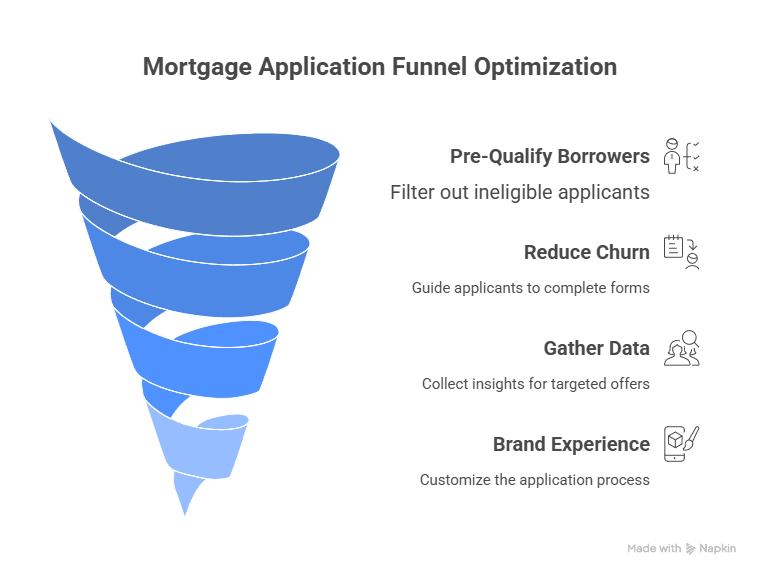
1. Pre-qualification at the top of the funnel. The tool collects loan amount, down payment, credit profile, and loan product before a single loan officer is involved. Borrowers who don't fit your lending criteria filter themselves out. Borrowers who do arrive at your sales team as warm, qualified leads.
2. Lower drop-off rates on application forms. Guided calculations and scenario-based outputs reduce abandoned forms. Borrowers see a real monthly mortgage payment and a real total cost. They get the answer they came for, which is what keeps them moving forward.
3. Higher quality lead data. Every input is a signal. The data tells your team which prospects are early-stage browsers, which are ready to refinance, and which are home buying for the first time.
4. A branded experience that doesn't leak prospects to competitors. When the tool carries your logo, your colors, your tone, and your mortgage loan products, prospects stay in your funnel. A third-party widget exports them.
H8g3ssDs57kE3XLB2
How does a custom calculator generate qualified mortgage leads?
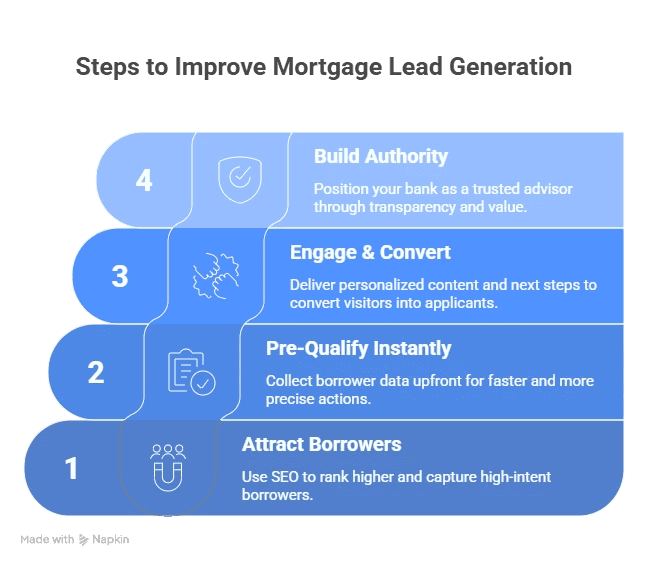
The tool turns a passive website visit into structured lead capture. A prospect lands on your site, enters their home buying or refinancing details, receives an instant monthly mortgage payment, and submits their contact information to talk to a loan officer or download a personalized PDF report.
The system runs in four steps:
Capture. The tool collects loan amount, down payment, loan term, credit score range, and property type. Optional fields can include employment income, property tax estimate, and current home loan balance for refinance scenarios.
Calculate. The tool returns a monthly mortgage payment, an amortization schedule, and a total cost over the loan term. APR is shown alongside the headline rate so prospects see the real cost.
Qualify. Inputs are scored against your lending criteria. Loan officers only see prospects who fit minimum credit qualifications, debt-to-income, and loan amount thresholds.
Route. Qualified leads flow into your CRM with all the inputs attached. The team can pick up the phone with full context of what the borrower is looking for.
The right interactive calculator connects to your existing tools. Salesforce, HubSpot, your email marketing platform, and your loan origination system all sync automatically. No double entry, no lost leads.
How Rabobank built theirs with Convert_
Rabobank's innovation team had an Excel model that calculated electric truck financing scenarios. The model worked, but it wasn't customer-ready. It needed to live on the web, capture leads, and update without IT involvement every time the team wanted to test a new pricing scenario.
The traditional approach (commission a developer, wait for a sprint, deploy to production) would have taken months and tied the project to IT's roadmap. Rabobank's team chose a different route.
They built it on Convert_, with no code, and went live in three weeks. The in-house team owned the build from day one, iterated on the fly, and added analytics without filing a single dev ticket. Every PDF download became a sales-ready lead with the full context of the buyer's scenario.
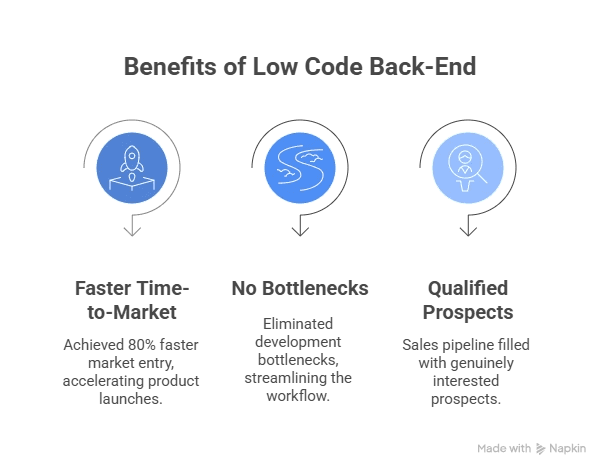
The result: 80% faster to market than a traditional build, no developer bottleneck, and a sales pipeline filled with prospects actively interested in financing rather than tire-kickers.
"You can go live quickly with the no code back-end. My team can iterate easily, make changes, and that's super handy and easy to do, at very low cost."
Michiel Esveld, Team Leader, Rabobank Innovation
Read the full Rabobank case study for the workflow and configuration walkthrough.
What features should a high-performing calculator have?
A custom build aimed at lead generation should handle five functions well.
Dynamic personalization. The tool should branch based on who's using it. A first-time home buying scenario looks different from a refinance scenario, which looks different from an investor scenario. The flow routes each user through the right path without forcing them to scroll past irrelevant fields.
Live rate scenarios across loan types. Fixed-rate mortgages, adjustable-rate mortgages, jumbo loans, VA loans, and refinance products each need different math. A high-performing build handles them all, with side-by-side comparison so prospects can see a 30-year fixed against a 5/1 ARM at a glance. Property tax, homeowner's insurance, and PMI should appear in the breakdown so the monthly payment matches what a borrower will actually pay.
Compliance built in. Banks operate under NMLS oversight, ADA accessibility requirements, and data privacy frameworks like GDPR, CCPA, and SOC2. The tool can't compromise on any of them. A custom build on a no-code platform like Convert_ inherits the platform's compliance posture, which reduces the burden on your internal compliance and IT teams.
CRM and analytics integration. Every interaction should flow into your CRM, your analytics stack, and your email marketing platform. Drop-off points, completion rates, and lead source attribution tell your team what's working and what to fix. Lead generation without analytics is guessing.
No-code agility. As Rabobank demonstrated, a no-code platform lets your team update the build the same week regulations change, rates move, or a new product launches. That speed compounds. A tool that adapts in real time stays useful. A tool that needs a dev ticket every quarter falls behind.
Start with this Convert_ mortgage calculator template and customize it for your mortgage loan products.

Who uses finance calculators?
Custom builds serve a wider range of finance professionals than just banks. Each segment uses them differently.
Mortgage brokers and advisors
Mortgage brokers use the tool to deliver instant scenario comparisons to clients on the spot. A broker can share a personalized link with a prospect, who then adjusts the borrowing amount, terms, and rates and sees live monthly payment breakdowns. The broker gets the full data set in their pipeline tool, which means follow-up calls start with all the relevant context already captured.
The output for the client is a clean side-by-side comparison: fixed rate vs adjustable rate vs interest-only, or 15 year vs 30 year. The output for the broker is a pre-qualified lead with the prospect's complete preferences and contact details.
Credit unions and building societies
Credit unions use these tools to engage members with transparent, branded experiences. A First-Time Buyer flow can simplify the home buying process by walking new buyers through home price, income, deposit, and insurance thresholds, returning an eligibility estimate based on the credit union's lending criteria.
Completed calculations trigger pre-qualification emails or appointment scheduling automatically. The back office gets notified to send out a loan packet, and the member sees follow-through within minutes, not days.
Digital lenders and fintechs
Digital lenders use them to convert online visitors into qualified leads at scale. Multi-step forms feed data straight into the loan origination system. Automated rate quote flows, instant document checklists, and conditional pre-approval triggers all run from a single embed.
A site visitor can run the math, upload identification and proof of income, and receive a pre-approved offer without a human touch until closing. For high-volume digital lenders, this is the only way to keep cost-per-lead in check.
Insurance and financial planning professionals
Insurance brokers and financial planners use these tools to surface the broader financial picture. A prospect entering a home purchase scenario can also see how property location affects insurance quotes, how loan duration affects long-term savings, and how a mortgage interacts with their retirement timeline. A planner using the tool during a video call can simulate retirement scenarios alongside the math, with all the data flowing into the CRM for next-step planning.
PDF reports and proposal documents auto-generate from the inputs, which means clients leave the meeting with something tangible.
Specialty lenders and any finance organization
Specialty lenders, regional banks, and any organization with custom loan products use these tools to put their pricing logic in front of prospects without exposing the internal rules. A "How Much Can I Borrow?" campaign can set boundaries dynamically based on current credit policies. Completed forms trigger workflow tasks in marketing, sales, and compliance systems automatically.
How do you build a finance calculator without code?
A custom build used to require a developer, a project manager, and a six-month timeline. That's no longer true. No-code platforms like Convert_ let banks, brokers, and fintechs build the tool from a template, customize the functions for their loan products, and embed it on their website in days, not months.
The steps:
Pick a starting template. Begin with the Convert_ mortgage template and adapt it. The core math (monthly payment, schedule, total cost) is already built in.
Customize the inputs and outputs. Add fields for the borrowing amount, deposit, interest rate, loan term, property tax, homeowner's insurance, PMI, and credit qualification band. Configure the outputs to match the format your loan officers and prospects expect.
Add your lending logic. Use conditional rules to handle different loan products: fixed rate, adjustable rate, refinance, VA loans, jumbo loans. The tool should branch automatically based on what the borrower is looking for.
Brand it. Apply your logo, colors, and typography. The end result should feel like a native part of your website, not a third-party widget.
Connect your CRM and email platform. Every completed flow should sync into your sales tools with all the inputs attached. Salesforce, HubSpot, and most email marketing platforms integrate natively.
Embed and test. Drop it into your home page, a dedicated landing page, or anywhere a lead might want to estimate a mortgage. Track completion rates and drop-off points, then iterate.
The cost of a no-code build runs in the range of a marketing tool subscription rather than a development project budget. For most banks and brokers, that's the difference between a single-month payback and a year-long project.
Ready to build your custom calculator?
A custom build is the cheapest qualified lead generation source most banks and brokers have access to. It runs 24/7, pre-qualifies prospects before they reach a loan officer, and routes them into your CRM with full context of what they're looking for.
Book a demo to see how Convert_ handles your loan products, compliance requirements, and CRM stack. Or start with a free Convert_ account and adapt the Convert_ template to your bank, brokerage, credit union, or fintech.
A custom mortgage calculator is an interactive tool on your website that calculates mortgage payments using your specific loan products. It lets banks, brokers, credit unions, and fintechs deliver branded calculations to site visitors while capturing leads at the same time.
Unlike a generic third-party widget, a custom calculator gives you control over the inputs (loan amount, down payment, interest rate, property tax, homeowner's insurance, PMI, credit score), the outputs (monthly mortgage payment, total cost over the loan term, amortization schedule, APR), and how leads flow into your CRM.
For lenders and finance professionals, the right tool does three things at once. It qualifies prospects before they reach a loan officer. It generates organic leads from search traffic. And it differentiates your brand from competitors using off-the-shelf widgets.
This guide covers what a custom calculator is, why it outperforms generic widgets for lead generation, what features matter, and how Rabobank built theirs in three weeks using Convert_.
KEY TAKEAWAYS
A custom calculator is a branded, interactive web tool that handles your specific loan products, rates, and pricing logic. Generic widgets only handle basic math.
The right tool captures loan amount, down payment, interest rate, property tax, PMI, homeowner's insurance, and credit score, and returns the monthly mortgage payment, total cost, and amortization on the spot.
Custom calculators reduce loan officer workload by pre-qualifying prospects before any phone call.
Rabobank built a custom calculator on Convert_ in three weeks with no developer involvement and went to market 80% faster than a traditional build.
A high-performing build handles fixed-rate mortgages, adjustable-rate mortgages, refinancing, VA loans, jumbo loans, and home loan refinance scenarios.
Compliance is non-negotiable: the tool needs to align with NMLS, ADA, and applicable data privacy rules (GDPR, CCPA, SOC2).
What is a custom mortgage calculator?
A custom mortgage calculator is a branded, interactive tool that runs on your website and calculates mortgage payments based on your specific loan products, rates, and qualification rules. The tool collects the exact inputs your loan officers need and routes the resulting lead directly into your CRM or origination system.
The core functions a custom calculator should include:
Loan amount and home purchase price
Down payment percentage or dollar amount
Interest rate, with separate rate paths for fixed-rate loans and adjustable-rate mortgages
Loan term (15, 20, or 30 years)
Property tax based on location
Homeowner's insurance estimate
Private mortgage insurance (PMI) for low deposit scenarios
Credit score range or band
The outputs a borrower expects:
Monthly mortgage payment, broken down by principal, interest, taxes, and insurance
Total amount paid over the loan term
Amortization schedule showing principal and interest progression
Annual percentage rate (APR) including fees
Side-by-side comparison of loan products (e.g., 30-year fixed vs 5/1 ARM, conventional vs VA loans, 15 year vs 30 year)
A loan calculator that handles these inputs and outputs becomes more than a math tool. It becomes a qualification step that filters serious home buying prospects from casual browsers.
Why do banks and brokers need a custom calculator?
Generic widgets give every site visitor the same experience. Your bank, your competitor, and a random real estate blog all look identical to a prospect, because the widget is identical. A custom build does the opposite. It reflects your products, your rates, your loan officer workflow, and your brand.
Four reasons banks, brokers, and credit unions invest in a custom build:
1. Pre-qualification at the top of the funnel. The tool collects loan amount, down payment, credit profile, and loan product before a single loan officer is involved. Borrowers who don't fit your lending criteria filter themselves out. Borrowers who do arrive at your sales team as warm, qualified leads.
2. Lower drop-off rates on application forms. Guided calculations and scenario-based outputs reduce abandoned forms. Borrowers see a real monthly mortgage payment and a real total cost. They get the answer they came for, which is what keeps them moving forward.
3. Higher quality lead data. Every input is a signal. The data tells your team which prospects are early-stage browsers, which are ready to refinance, and which are home buying for the first time.
4. A branded experience that doesn't leak prospects to competitors. When the tool carries your logo, your colors, your tone, and your mortgage loan products, prospects stay in your funnel. A third-party widget exports them.
H8g3ssDs57kE3XLB2
How does a custom calculator generate qualified mortgage leads?
The tool turns a passive website visit into structured lead capture. A prospect lands on your site, enters their home buying or refinancing details, receives an instant monthly mortgage payment, and submits their contact information to talk to a loan officer or download a personalized PDF report.
The system runs in four steps:
Capture. The tool collects loan amount, down payment, loan term, credit score range, and property type. Optional fields can include employment income, property tax estimate, and current home loan balance for refinance scenarios.
Calculate. The tool returns a monthly mortgage payment, an amortization schedule, and a total cost over the loan term. APR is shown alongside the headline rate so prospects see the real cost.
Qualify. Inputs are scored against your lending criteria. Loan officers only see prospects who fit minimum credit qualifications, debt-to-income, and loan amount thresholds.
Route. Qualified leads flow into your CRM with all the inputs attached. The team can pick up the phone with full context of what the borrower is looking for.
The right interactive calculator connects to your existing tools. Salesforce, HubSpot, your email marketing platform, and your loan origination system all sync automatically. No double entry, no lost leads.
How Rabobank built theirs with Convert_
Rabobank's innovation team had an Excel model that calculated electric truck financing scenarios. The model worked, but it wasn't customer-ready. It needed to live on the web, capture leads, and update without IT involvement every time the team wanted to test a new pricing scenario.
The traditional approach (commission a developer, wait for a sprint, deploy to production) would have taken months and tied the project to IT's roadmap. Rabobank's team chose a different route.
They built it on Convert_, with no code, and went live in three weeks. The in-house team owned the build from day one, iterated on the fly, and added analytics without filing a single dev ticket. Every PDF download became a sales-ready lead with the full context of the buyer's scenario.
The result: 80% faster to market than a traditional build, no developer bottleneck, and a sales pipeline filled with prospects actively interested in financing rather than tire-kickers.
"You can go live quickly with the no code back-end. My team can iterate easily, make changes, and that's super handy and easy to do, at very low cost."
Michiel Esveld, Team Leader, Rabobank Innovation
Read the full Rabobank case study for the workflow and configuration walkthrough.
What features should a high-performing calculator have?
A custom build aimed at lead generation should handle five functions well.
Dynamic personalization. The tool should branch based on who's using it. A first-time home buying scenario looks different from a refinance scenario, which looks different from an investor scenario. The flow routes each user through the right path without forcing them to scroll past irrelevant fields.
Live rate scenarios across loan types. Fixed-rate mortgages, adjustable-rate mortgages, jumbo loans, VA loans, and refinance products each need different math. A high-performing build handles them all, with side-by-side comparison so prospects can see a 30-year fixed against a 5/1 ARM at a glance. Property tax, homeowner's insurance, and PMI should appear in the breakdown so the monthly payment matches what a borrower will actually pay.
Compliance built in. Banks operate under NMLS oversight, ADA accessibility requirements, and data privacy frameworks like GDPR, CCPA, and SOC2. The tool can't compromise on any of them. A custom build on a no-code platform like Convert_ inherits the platform's compliance posture, which reduces the burden on your internal compliance and IT teams.
CRM and analytics integration. Every interaction should flow into your CRM, your analytics stack, and your email marketing platform. Drop-off points, completion rates, and lead source attribution tell your team what's working and what to fix. Lead generation without analytics is guessing.
No-code agility. As Rabobank demonstrated, a no-code platform lets your team update the build the same week regulations change, rates move, or a new product launches. That speed compounds. A tool that adapts in real time stays useful. A tool that needs a dev ticket every quarter falls behind.
Start with this Convert_ mortgage calculator template and customize it for your mortgage loan products.
Who uses finance calculators?
Custom builds serve a wider range of finance professionals than just banks. Each segment uses them differently.
Mortgage brokers and advisors
Mortgage brokers use the tool to deliver instant scenario comparisons to clients on the spot. A broker can share a personalized link with a prospect, who then adjusts the borrowing amount, terms, and rates and sees live monthly payment breakdowns. The broker gets the full data set in their pipeline tool, which means follow-up calls start with all the relevant context already captured.
The output for the client is a clean side-by-side comparison: fixed rate vs adjustable rate vs interest-only, or 15 year vs 30 year. The output for the broker is a pre-qualified lead with the prospect's complete preferences and contact details.
Credit unions and building societies
Credit unions use these tools to engage members with transparent, branded experiences. A First-Time Buyer flow can simplify the home buying process by walking new buyers through home price, income, deposit, and insurance thresholds, returning an eligibility estimate based on the credit union's lending criteria.
Completed calculations trigger pre-qualification emails or appointment scheduling automatically. The back office gets notified to send out a loan packet, and the member sees follow-through within minutes, not days.
Digital lenders and fintechs
Digital lenders use them to convert online visitors into qualified leads at scale. Multi-step forms feed data straight into the loan origination system. Automated rate quote flows, instant document checklists, and conditional pre-approval triggers all run from a single embed.
A site visitor can run the math, upload identification and proof of income, and receive a pre-approved offer without a human touch until closing. For high-volume digital lenders, this is the only way to keep cost-per-lead in check.
Insurance and financial planning professionals
Insurance brokers and financial planners use these tools to surface the broader financial picture. A prospect entering a home purchase scenario can also see how property location affects insurance quotes, how loan duration affects long-term savings, and how a mortgage interacts with their retirement timeline. A planner using the tool during a video call can simulate retirement scenarios alongside the math, with all the data flowing into the CRM for next-step planning.
PDF reports and proposal documents auto-generate from the inputs, which means clients leave the meeting with something tangible.
Specialty lenders and any finance organization
Specialty lenders, regional banks, and any organization with custom loan products use these tools to put their pricing logic in front of prospects without exposing the internal rules. A "How Much Can I Borrow?" campaign can set boundaries dynamically based on current credit policies. Completed forms trigger workflow tasks in marketing, sales, and compliance systems automatically.
How do you build a finance calculator without code?
A custom build used to require a developer, a project manager, and a six-month timeline. That's no longer true. No-code platforms like Convert_ let banks, brokers, and fintechs build the tool from a template, customize the functions for their loan products, and embed it on their website in days, not months.
The steps:
Pick a starting template. Begin with the Convert_ mortgage template and adapt it. The core math (monthly payment, schedule, total cost) is already built in.
Customize the inputs and outputs. Add fields for the borrowing amount, deposit, interest rate, loan term, property tax, homeowner's insurance, PMI, and credit qualification band. Configure the outputs to match the format your loan officers and prospects expect.
Add your lending logic. Use conditional rules to handle different loan products: fixed rate, adjustable rate, refinance, VA loans, jumbo loans. The tool should branch automatically based on what the borrower is looking for.
Brand it. Apply your logo, colors, and typography. The end result should feel like a native part of your website, not a third-party widget.
Connect your CRM and email platform. Every completed flow should sync into your sales tools with all the inputs attached. Salesforce, HubSpot, and most email marketing platforms integrate natively.
Embed and test. Drop it into your home page, a dedicated landing page, or anywhere a lead might want to estimate a mortgage. Track completion rates and drop-off points, then iterate.
The cost of a no-code build runs in the range of a marketing tool subscription rather than a development project budget. For most banks and brokers, that's the difference between a single-month payback and a year-long project.
Ready to build your custom calculator?
A custom build is the cheapest qualified lead generation source most banks and brokers have access to. It runs 24/7, pre-qualifies prospects before they reach a loan officer, and routes them into your CRM with full context of what they're looking for.
Book a demo to see how Convert_ handles your loan products, compliance requirements, and CRM stack. Or start with a free Convert_ account and adapt the Convert_ template to your bank, brokerage, credit union, or fintech.
FAQ
Read our answers to frequently asked questions below.
What's the difference between a custom finance calculator and a generic one?
A generic widget runs the same math for every visitor regardless of the lender's actual loan products. A custom build is configured around your specific loan types, rates, qualification criteria, and brand. A borrower using a generic widget gets a rough payment estimate. A borrower using a custom build gets a payment estimate tied to your bank's actual offerings, then becomes a qualified lead in your CRM.
The other difference is data ownership. Generic widgets export prospects to whoever runs the widget. Custom builds keep every lead in your funnel.
How long does it take to build a finance calculator?
A custom build on a no-code platform can go live in two to four weeks for most banks and brokers. Rabobank built theirs on Convert_ in three weeks. A developer-built tool typically takes three to six months and runs into the tens of thousands of dollars before launch.
The largest variable is internal review (compliance, brand, IT). The build itself is the smallest part of the timeline.
Can a custom calculator handle different mortgage loan types?
Yes. The tool should handle every mortgage loan type your bank or brokerage offers, including fixed-rate mortgages, adjustable-rate mortgages, jumbo loans, VA loans, FHA loans, conventional loans, refinance products, and home equity options. Conditional logic routes each borrower through the right flow so they only see the inputs and outputs relevant to their scenario.
For brokers comparing multiple lenders, a side-by-side scenario tool can display a fixed rate from one lender alongside an adjustable rate from another, with the monthly payment and APR shown for each.
How does a custom calculator collect leads?
The tool collects leads by capturing the borrower's calculation inputs alongside a contact form. After the prospect sees their monthly payment and schedule, the tool can require an email address or phone number to unlock a PDF report, save the scenario, or proceed to a pre-qualification check.
The completed lead flows directly into the bank's or broker's CRM with the full input set attached. The sales team sees the borrowing amount the prospect is considering, the credit band they self-reported, and the loan product they're shopping for, before the first follow-up call.
Is a custom calculator NMLS and compliance friendly?
A custom build on a compliant no-code platform inherits the platform's compliance posture. Convert_ supports the technical and operational requirements that align with regulatory oversight, ADA accessibility, GDPR, CCPA, and SOC2 frameworks.
Banks remain responsible for the content displayed in the tool (rate disclosures, fee disclosures, regulatory language), but the platform handles the underlying data handling, accessibility, and audit trails.
For licensed lenders, the tool should display required disclosures next to any quoted rate, and the data captured should be retained according to applicable record-keeping rules.




More leads in less time_
Stop wasting time on manual quotes. Automate your lead funnel today.
Create powerful on brand calculators, lead generation forms and apps that automate your marketing and sales processes
Start with a template
Find inspiration or customize an outstanding template, complete with functional formulas and flows to help you get started.
Let us build for you
We can build your calculator, and afterwards you can always make changes yourself. Our service starts at just $250.
More leads in less time_
Stop wasting time on manual quotes. Automate your lead funnel today.
Create powerful on brand calculators, lead generation forms and apps that automate your marketing and sales processes
Start with a template
Find inspiration or customize an outstanding template, complete with functional formulas and flows to help you get started.
Let us build for you
We can build your calculator, and afterwards you can always make changes yourself. Our service starts at just $250.