
All categories


For small businesses creating online forms, the biggest challenge is choosing a tool that is easy to start with but does not limit you as your needs grow.
Jotform and Typeform focus on form creation and presentation, while Google Forms focuses on simplicity and cost.
Convert_ is designed for complex calculations and logic-driven workflows.
This comparison, updated for 2026, examines how these four platforms differ in features, customization, conditional logic, data handling, integrations, and pricing. Discover the best fit for your business.
Key Takeaways: Best Use Cases
Convert_: Complex forms and calculators powered by advanced calculations
Jotform: Creating structured forms with strong data collection features
Google Forms: Individuals and small teams needing basic forms at no cost
Typeform: Stylish, conversational forms showing one question at a time
Convert_ vs Jotform vs Google Forms vs Typeform Feature Summary
All four platforms support form building, but their depth varies significantly.
Convert_, Jotform, and Typeform offer more advanced features than Google Forms. Their conditional logic and question types allow more flexibility when building workflows.
Convert_ stands out when forms need to process data using calculations, such as pricing, ROI, or usage-based outputs.
Let’s take a closer look at:
Customization
Conditional logic
Data collection and analysis
Integrations
Pricing
Customization
Customization affects branding, user experience, and flexibility.
Convert_ and Jotform offer stronger customization options. Jotform and Convert_ support custom CSS, allowing deeper control over layout and branding.
Google Forms offers minimal customization, limited to colors, fonts, and header images.
Typeform focuses on polished defaults and templates but does not support CSS customization.
To highly customize forms with CSS, you need to have a working knowledge of CSS.
The learning curve is higher.
It takes more effort to make your form look good.
You need to know design basics to see what looks good.
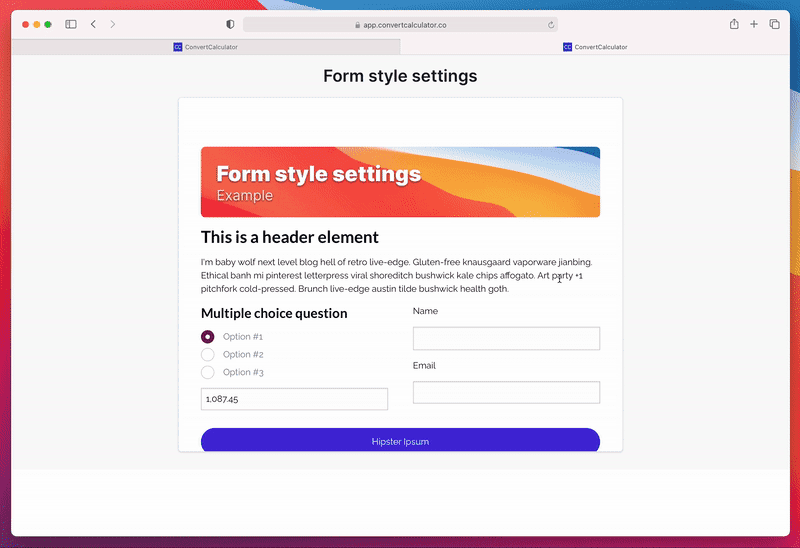
With Convert_, you have 3 main options when styling your forms:
Form Style Settings - adjust the global styles of your form (general settings, font, heading, and action button styles).
Item Style Settings - options to change specific form elements. This setting is similar to the form style settings.
Custom Styling with CSS - use if you need even more styling options. It allows you to change any aspect of your form.
Conditional Logic
All four tools include conditional logic, but the depth differs.
Convert_
Convert_ combines conditional logic with FormulaScript, enabling IF, AND, and OR conditions tied to variables, tables, and inputs. This means your forms can dynamically generate options, calculate results, and adapt in real time.
Convert_ supports use cases that go beyond standard form logic. For instance, the platform handles dynamic pricing, allowing you to pull data from external sources to instantly update pricing in booking forms. Creating multi-step forms is also easy with this software.
oJ4vcAPdAh7bWE5kZ
Jotform
Jotform supports multiple logic actions, such as show/hide fields. This makes it effective for structured forms and data collection, though calculations are not its primary strength.
Google Forms
Google Forms offers basic logic by routing users to different sections based on answers. More advanced logic, such as compound conditions, is not supported.
Typeform
Typeform uses a visual logic map that makes it easy to see user paths. This works well for simple flows but is limited when calculations or data-driven branching are required.
Data Collection and Analysis
All platforms collect form submissions, but the depth of insight varies.
Jotform provides dashboards, partial submission tracking, approval flows, and PDF generation.
Google Forms offers summaries and basic response views but lacks deeper analytics.
Typeform includes completion rates and drop-off analysis, but does not support partial submissions.
Convert_ captures both full and partial submissions automatically and supports multiple data outputs, including dashboards, tables, CRM syncing, PDFs, APIs, and webhooks. This makes it well-suited to lead capture and calculation-based workflows.
Here are 9 ways to collect submission data with Convert_:
Submissions dashboard - an in-app overview of your submissions
Email - receive submission data in your email and/or send the quote directly to your lead.
Table - write data to a ConvertCalculator table.
CRM (Hubspot) - collect submission data in Hubspot and let your sales team follow up with ease.
Spreadsheet (Google Sheet) - save submission data in a spreadsheet for easy access and analysis.
Data flow automation (Zapier) - connect to 1000+ apps with Zapier.
JavaScript API - if you know how to code, you can fetch your calculator data through our API.
PDF generation - process submission data into a PDF.
Webhooks - use webhooks to integrate with external services.
Integrations
Integration flexibility matters when forms are part of a broader workflow.
Jotform offers a wide range of direct integrations and automation support.
Typeform provides fewer native integrations but supports common marketing and CRM tools.
Google Forms relies primarily on the Google ecosystem and does not offer broader native integrations.
Convert_ supports direct integrations with common platforms and extends functionality through Zapier and webhooks. It also integrates with analytics tools to track behavior and performance.
It connects to the following:
Google Analytics
Google Tag Manager
Amplitude
Mixpanel
Facebook Pixel
Convert_ vs Jotform vs Google Forms vs Typeform Pricing
Convert_ Pricing
Convert_ offers a free forever plan with full feature access for up to 100 visits per month. This lets you build and test your forms before deciding on a subscription.
Paid plans scale based on usage and support advanced calculation and automation use cases.
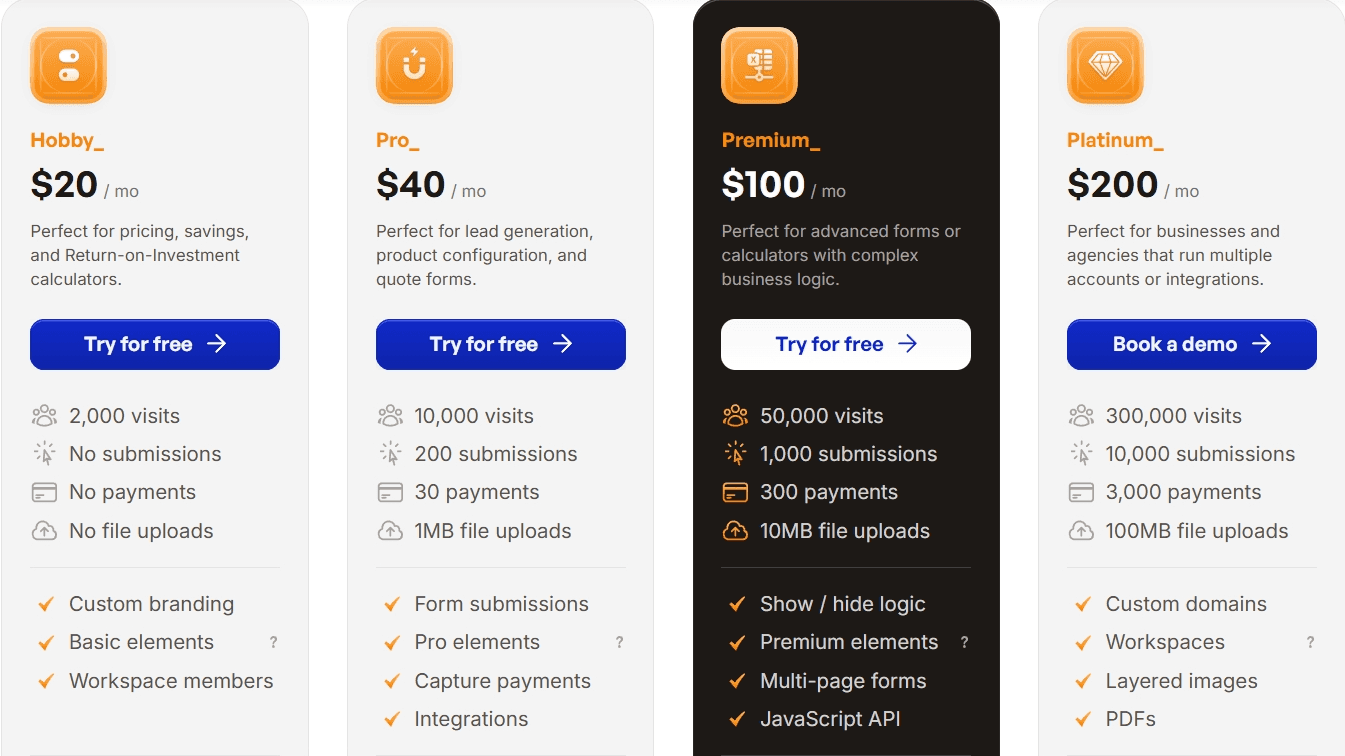
Here is the monthly pricing for each Convert_ plan:
Hobby - $20
Pro - $40
Premium - $100
Platinum - $200
Jotform Pricing
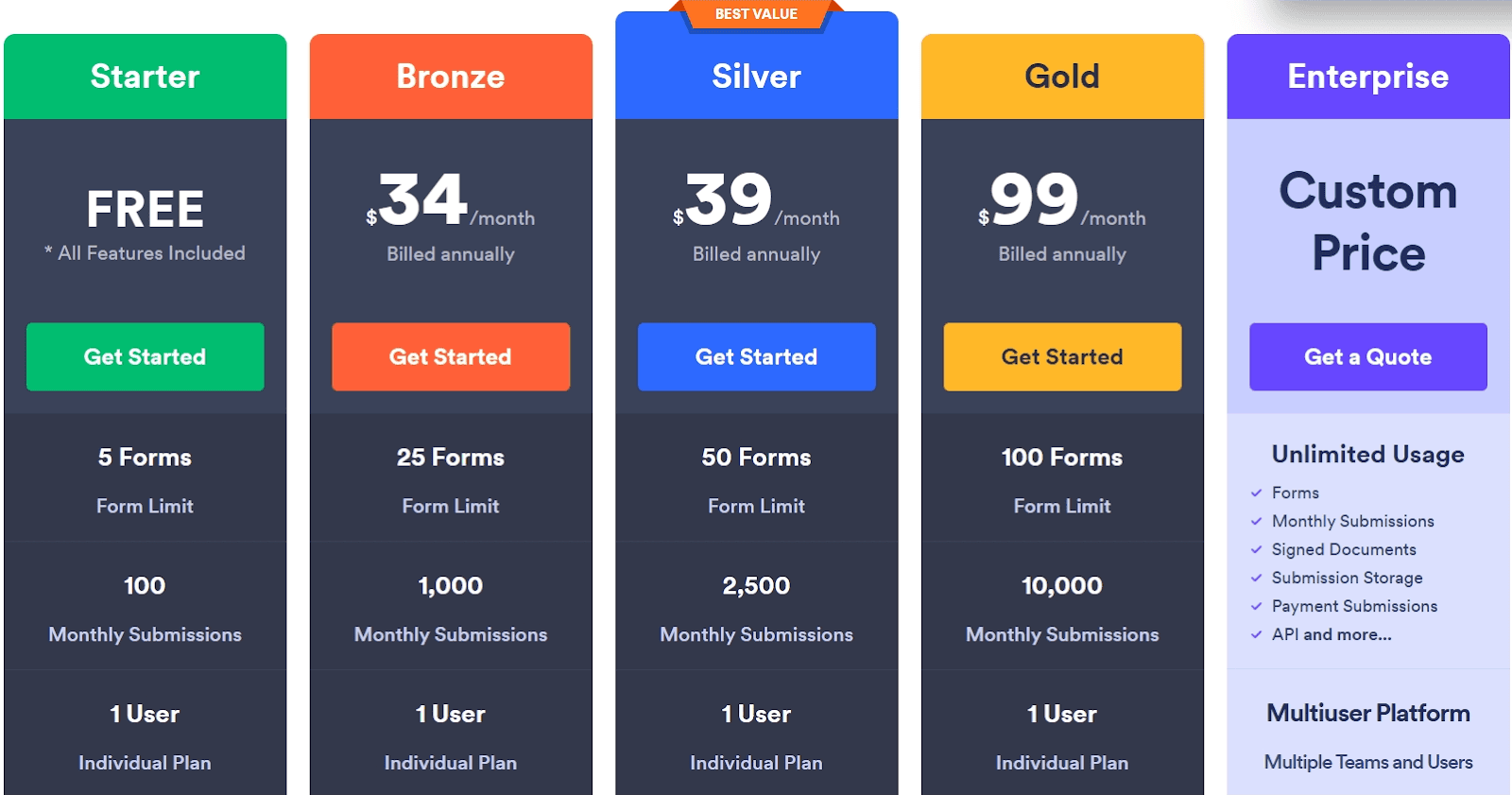
Jotform offers multiple pricing tiers, including a free plan with usage limits. Paid plans scale based on submissions, storage, and advanced features.
Here is the monthly pricing for each Jotform plan:
Bronze - $34
Silver - $39
Gold - $99
Enterprise - Custom pricing
Google Forms Pricing
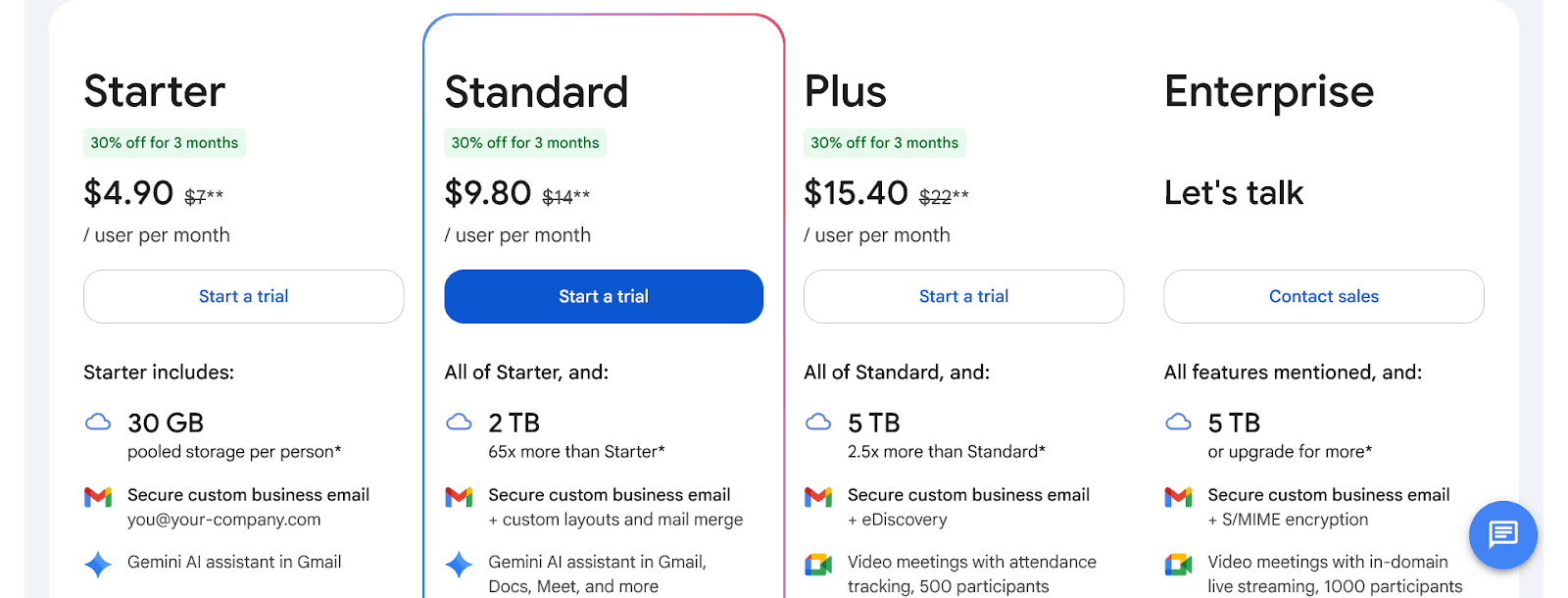
Google Forms is free for individual use. Businesses must subscribe to Google Workspace, though form functionality remains limited compared to other platforms.
Here is the monthly pricing for each Google Workspace plan:
Starter - $7
Standard - $14
Plus - $22
Enterprise - Custom pricing
Typeform Pricing
Typeform offers several paid plans with limits on responses and features. Pricing reflects its focus on design and presentation.
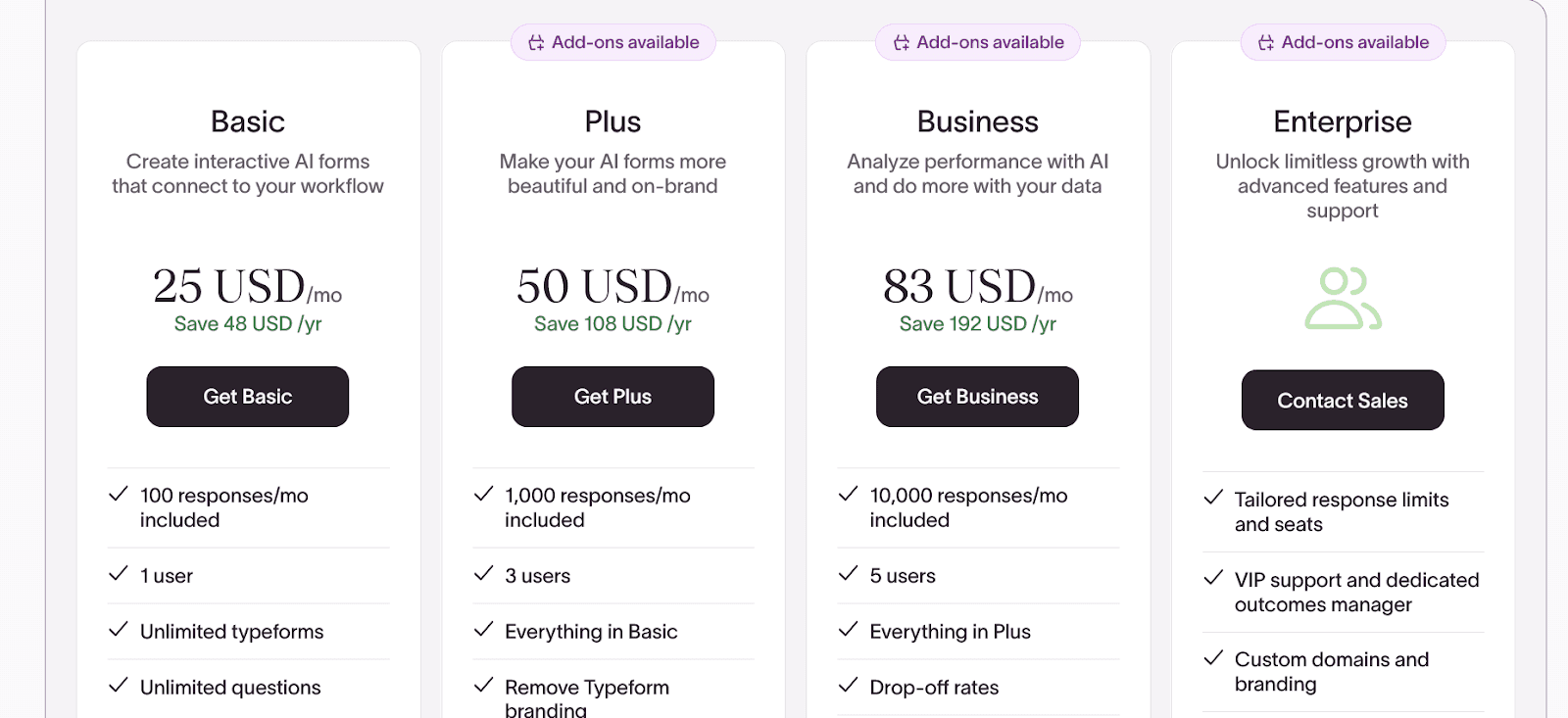
Here is the monthly pricing for each Typeform plan:
Basic - $25
Plus - $50
Business - $83
Enterprise - Custom pricing
How Do Convert_Forms Help Companies?
Goodhart Coffee used Convert_ to replace a manual quoting and booking process with an automated calculator form.
They embedded the booking form into their website. Now, their customers can input their requirements and receive instant feedback on availability and pricing.
With the embedded form, Goodhart Coffee doubled bookings and saved 40 hours per week on quoting. Our calculation-driven forms can remove operational friction while increasing conversions.
What is Convert_?
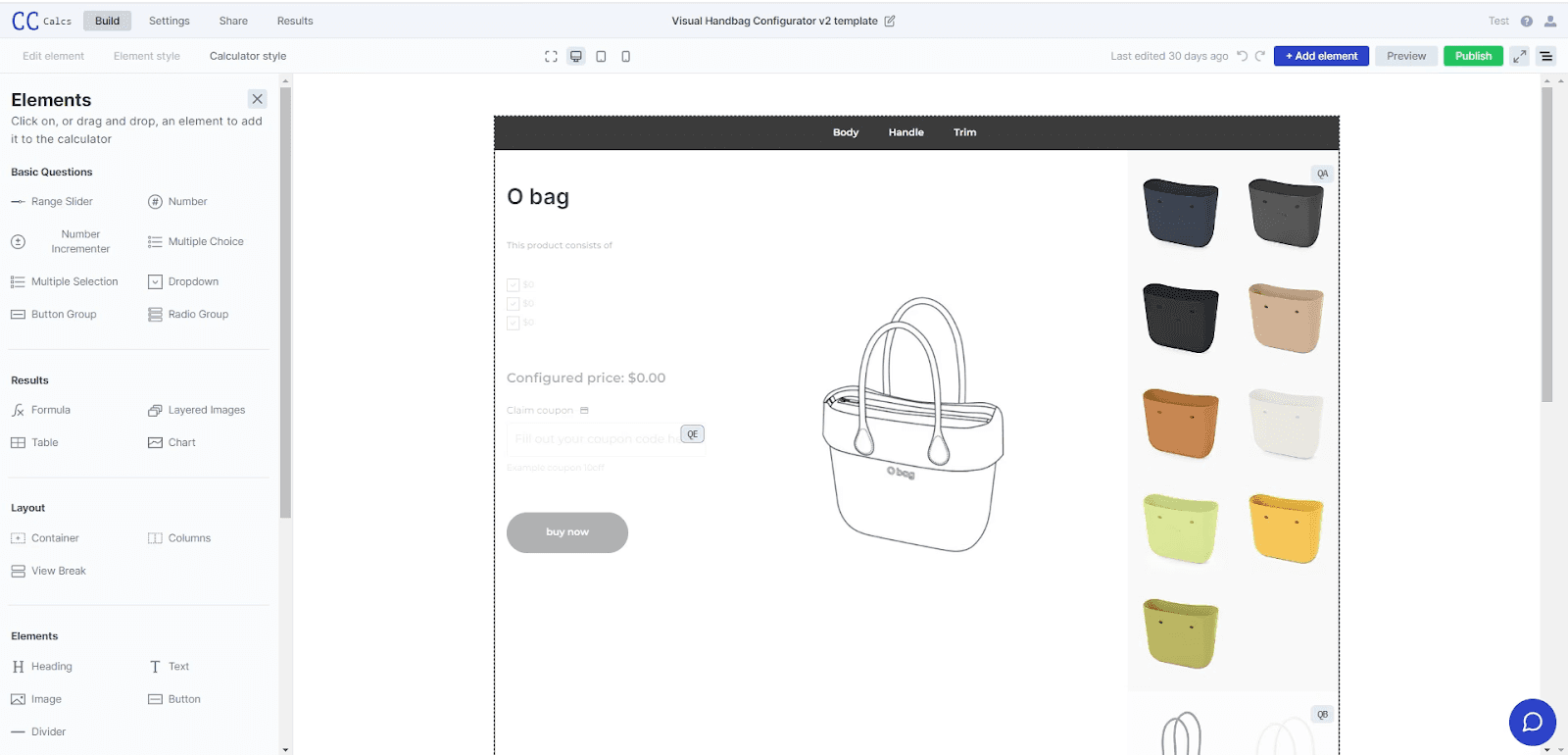
Convert_ is a powerful software that allows you to create online order forms, calculators, product configurators, quizzes, surveys, and more. It’s simple and convenient to use, needing no coding skills.
With Convert_, you can build forms with complex question types and customize them to suit your branding and website.
Convert_ is super powerful when it comes to processing data with calculations. Users get instant value from this feature, like seeing accurate prices or calculating ROI.
What is Jotform?
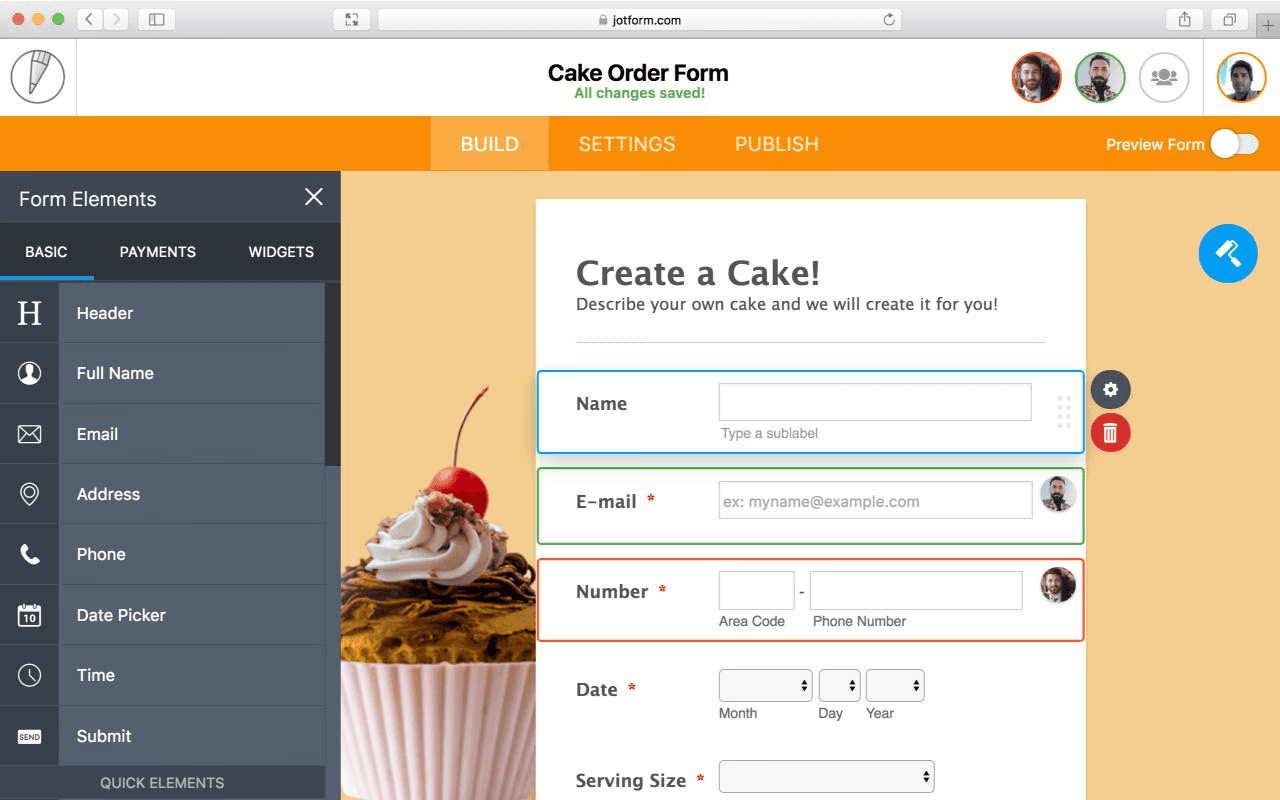
Jotform is an online form builder. It allows individuals and businesses to create and customize forms, surveys, and questionnaires.
Jotform has a drag-and-drop form editor, making it easy for users to design and build forms. Users can create them for many purposes, including lead generation, event registrations, customer feedback, online payments, and job applications.
What is Google Forms?
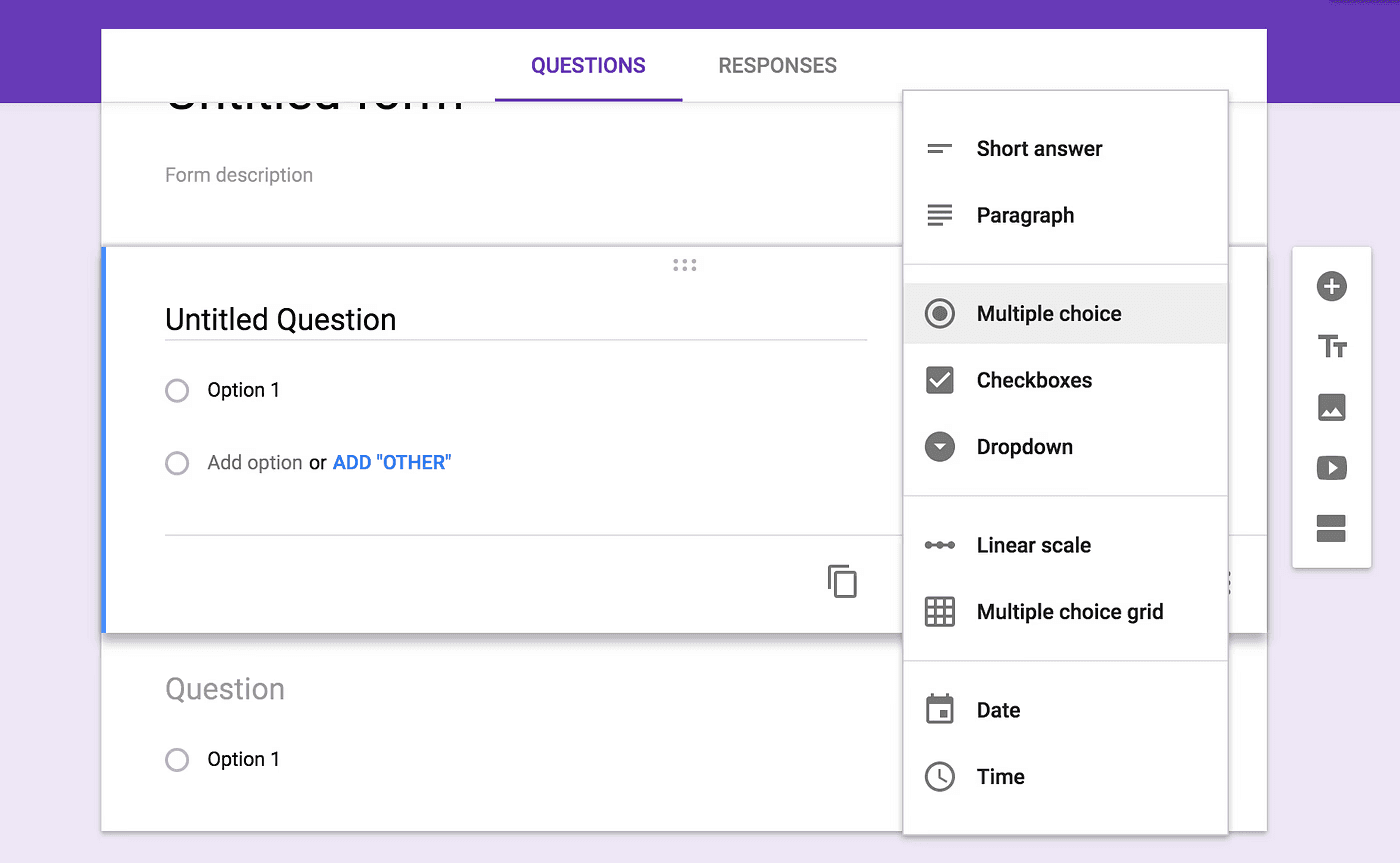
Google Forms is a free online form builder. It's an excellent free option for creating basic forms and has some good features.
With Google Forms, users miss out on the advanced design features and question types of other tools. But it's easy to use and integrates seamlessly with other Google tools like Sheets and Drive.
What is Typeform?
Typeform is an online form builder and survey tool. It has an attractive interface and is easy to use, with a simple drag-and-drop feature.
Users experience one question at a time with Typeform. Some view this approach as more conversational and engaging for users.
Final Verdict
Each platform serves a different type of user.
Use Google Forms if you need a basic form at no cost.
Use Typeform if design and conversational flow matter most.
Use Jotform if you want structured forms with strong data handling.
Use Convert_ if your forms need calculations, automation, and logic-driven results.
Convert_ provides the most flexibility when forms must do more than collect answers and instead deliver instant, data-driven value.
For small businesses creating online forms, the biggest challenge is choosing a tool that is easy to start with but does not limit you as your needs grow.
Jotform and Typeform focus on form creation and presentation, while Google Forms focuses on simplicity and cost.
Convert_ is designed for complex calculations and logic-driven workflows.
This comparison, updated for 2026, examines how these four platforms differ in features, customization, conditional logic, data handling, integrations, and pricing. Discover the best fit for your business.
Key Takeaways: Best Use Cases
Convert_: Complex forms and calculators powered by advanced calculations
Jotform: Creating structured forms with strong data collection features
Google Forms: Individuals and small teams needing basic forms at no cost
Typeform: Stylish, conversational forms showing one question at a time
Convert_ vs Jotform vs Google Forms vs Typeform Feature Summary
All four platforms support form building, but their depth varies significantly.
Convert_, Jotform, and Typeform offer more advanced features than Google Forms. Their conditional logic and question types allow more flexibility when building workflows.
Convert_ stands out when forms need to process data using calculations, such as pricing, ROI, or usage-based outputs.
Let’s take a closer look at:
Customization
Conditional logic
Data collection and analysis
Integrations
Pricing
Customization
Customization affects branding, user experience, and flexibility.
Convert_ and Jotform offer stronger customization options. Jotform and Convert_ support custom CSS, allowing deeper control over layout and branding.
Google Forms offers minimal customization, limited to colors, fonts, and header images.
Typeform focuses on polished defaults and templates but does not support CSS customization.
To highly customize forms with CSS, you need to have a working knowledge of CSS.
The learning curve is higher.
It takes more effort to make your form look good.
You need to know design basics to see what looks good.
With Convert_, you have 3 main options when styling your forms:
Form Style Settings - adjust the global styles of your form (general settings, font, heading, and action button styles).
Item Style Settings - options to change specific form elements. This setting is similar to the form style settings.
Custom Styling with CSS - use if you need even more styling options. It allows you to change any aspect of your form.

Conditional Logic
All four tools include conditional logic, but the depth differs.
Convert_
Convert_ combines conditional logic with FormulaScript, enabling IF, AND, and OR conditions tied to variables, tables, and inputs. This means your forms can dynamically generate options, calculate results, and adapt in real time.
Convert_ supports use cases that go beyond standard form logic. For instance, the platform handles dynamic pricing, allowing you to pull data from external sources to instantly update pricing in booking forms. Creating multi-step forms is also easy with this software.
oJ4vcAPdAh7bWE5kZ
Jotform
Jotform supports multiple logic actions, such as show/hide fields. This makes it effective for structured forms and data collection, though calculations are not its primary strength.
Google Forms
Google Forms offers basic logic by routing users to different sections based on answers. More advanced logic, such as compound conditions, is not supported.
Typeform
Typeform uses a visual logic map that makes it easy to see user paths. This works well for simple flows but is limited when calculations or data-driven branching are required.
Data Collection and Analysis
All platforms collect form submissions, but the depth of insight varies.
Jotform provides dashboards, partial submission tracking, approval flows, and PDF generation.
Google Forms offers summaries and basic response views but lacks deeper analytics.
Typeform includes completion rates and drop-off analysis, but does not support partial submissions.
Convert_ captures both full and partial submissions automatically and supports multiple data outputs, including dashboards, tables, CRM syncing, PDFs, APIs, and webhooks. This makes it well-suited to lead capture and calculation-based workflows.
Here are 9 ways to collect submission data with Convert_:
Submissions dashboard - an in-app overview of your submissions
Email - receive submission data in your email and/or send the quote directly to your lead.
Table - write data to a ConvertCalculator table.
CRM (Hubspot) - collect submission data in Hubspot and let your sales team follow up with ease.
Spreadsheet (Google Sheet) - save submission data in a spreadsheet for easy access and analysis.
Data flow automation (Zapier) - connect to 1000+ apps with Zapier.
JavaScript API - if you know how to code, you can fetch your calculator data through our API.
PDF generation - process submission data into a PDF.
Webhooks - use webhooks to integrate with external services.
Integrations
Integration flexibility matters when forms are part of a broader workflow.
Jotform offers a wide range of direct integrations and automation support.
Typeform provides fewer native integrations but supports common marketing and CRM tools.
Google Forms relies primarily on the Google ecosystem and does not offer broader native integrations.
Convert_ supports direct integrations with common platforms and extends functionality through Zapier and webhooks. It also integrates with analytics tools to track behavior and performance.
It connects to the following:
Google Analytics
Google Tag Manager
Amplitude
Mixpanel
Facebook Pixel
Convert_ vs Jotform vs Google Forms vs Typeform Pricing
Convert_ Pricing
Convert_ offers a free forever plan with full feature access for up to 100 visits per month. This lets you build and test your forms before deciding on a subscription.
Paid plans scale based on usage and support advanced calculation and automation use cases.
Here is the monthly pricing for each Convert_ plan:
Hobby - $20
Pro - $40
Premium - $100
Platinum - $200

Jotform Pricing
Jotform offers multiple pricing tiers, including a free plan with usage limits. Paid plans scale based on submissions, storage, and advanced features.
Here is the monthly pricing for each Jotform plan:
Bronze - $34
Silver - $39
Gold - $99
Enterprise - Custom pricing

Google Forms Pricing
Google Forms is free for individual use. Businesses must subscribe to Google Workspace, though form functionality remains limited compared to other platforms.
Here is the monthly pricing for each Google Workspace plan:
Starter - $7
Standard - $14
Plus - $22
Enterprise - Custom pricing

Typeform Pricing
Typeform offers several paid plans with limits on responses and features. Pricing reflects its focus on design and presentation.
Here is the monthly pricing for each Typeform plan:
Basic - $25
Plus - $50
Business - $83
Enterprise - Custom pricing

How Do Convert_Forms Help Companies?
Goodhart Coffee used Convert_ to replace a manual quoting and booking process with an automated calculator form.
They embedded the booking form into their website. Now, their customers can input their requirements and receive instant feedback on availability and pricing.
With the embedded form, Goodhart Coffee doubled bookings and saved 40 hours per week on quoting. Our calculation-driven forms can remove operational friction while increasing conversions.
What is Convert_?
Convert_ is a powerful software that allows you to create online order forms, calculators, product configurators, quizzes, surveys, and more. It’s simple and convenient to use, needing no coding skills.
With Convert_, you can build forms with complex question types and customize them to suit your branding and website.
Convert_ is super powerful when it comes to processing data with calculations. Users get instant value from this feature, like seeing accurate prices or calculating ROI.

What is Jotform?
Jotform is an online form builder. It allows individuals and businesses to create and customize forms, surveys, and questionnaires.
Jotform has a drag-and-drop form editor, making it easy for users to design and build forms. Users can create them for many purposes, including lead generation, event registrations, customer feedback, online payments, and job applications.

What is Google Forms?
Google Forms is a free online form builder. It's an excellent free option for creating basic forms and has some good features.
With Google Forms, users miss out on the advanced design features and question types of other tools. But it's easy to use and integrates seamlessly with other Google tools like Sheets and Drive.

What is Typeform?
Typeform is an online form builder and survey tool. It has an attractive interface and is easy to use, with a simple drag-and-drop feature.
Users experience one question at a time with Typeform. Some view this approach as more conversational and engaging for users.

Final Verdict
Each platform serves a different type of user.
Use Google Forms if you need a basic form at no cost.
Use Typeform if design and conversational flow matter most.
Use Jotform if you want structured forms with strong data handling.
Use Convert_ if your forms need calculations, automation, and logic-driven results.
Convert_ provides the most flexibility when forms must do more than collect answers and instead deliver instant, data-driven value.
For small businesses creating online forms, the biggest challenge is choosing a tool that is easy to start with but does not limit you as your needs grow.
Jotform and Typeform focus on form creation and presentation, while Google Forms focuses on simplicity and cost.
Convert_ is designed for complex calculations and logic-driven workflows.
This comparison, updated for 2026, examines how these four platforms differ in features, customization, conditional logic, data handling, integrations, and pricing. Discover the best fit for your business.
Key Takeaways: Best Use Cases
Convert_: Complex forms and calculators powered by advanced calculations
Jotform: Creating structured forms with strong data collection features
Google Forms: Individuals and small teams needing basic forms at no cost
Typeform: Stylish, conversational forms showing one question at a time
Convert_ vs Jotform vs Google Forms vs Typeform Feature Summary
All four platforms support form building, but their depth varies significantly.
Convert_, Jotform, and Typeform offer more advanced features than Google Forms. Their conditional logic and question types allow more flexibility when building workflows.
Convert_ stands out when forms need to process data using calculations, such as pricing, ROI, or usage-based outputs.
Let’s take a closer look at:
Customization
Conditional logic
Data collection and analysis
Integrations
Pricing
Customization
Customization affects branding, user experience, and flexibility.
Convert_ and Jotform offer stronger customization options. Jotform and Convert_ support custom CSS, allowing deeper control over layout and branding.
Google Forms offers minimal customization, limited to colors, fonts, and header images.
Typeform focuses on polished defaults and templates but does not support CSS customization.
To highly customize forms with CSS, you need to have a working knowledge of CSS.
The learning curve is higher.
It takes more effort to make your form look good.
You need to know design basics to see what looks good.
With Convert_, you have 3 main options when styling your forms:
Form Style Settings - adjust the global styles of your form (general settings, font, heading, and action button styles).
Item Style Settings - options to change specific form elements. This setting is similar to the form style settings.
Custom Styling with CSS - use if you need even more styling options. It allows you to change any aspect of your form.

Conditional Logic
All four tools include conditional logic, but the depth differs.
Convert_
Convert_ combines conditional logic with FormulaScript, enabling IF, AND, and OR conditions tied to variables, tables, and inputs. This means your forms can dynamically generate options, calculate results, and adapt in real time.
Convert_ supports use cases that go beyond standard form logic. For instance, the platform handles dynamic pricing, allowing you to pull data from external sources to instantly update pricing in booking forms. Creating multi-step forms is also easy with this software.
oJ4vcAPdAh7bWE5kZ
Jotform
Jotform supports multiple logic actions, such as show/hide fields. This makes it effective for structured forms and data collection, though calculations are not its primary strength.
Google Forms
Google Forms offers basic logic by routing users to different sections based on answers. More advanced logic, such as compound conditions, is not supported.
Typeform
Typeform uses a visual logic map that makes it easy to see user paths. This works well for simple flows but is limited when calculations or data-driven branching are required.
Data Collection and Analysis
All platforms collect form submissions, but the depth of insight varies.
Jotform provides dashboards, partial submission tracking, approval flows, and PDF generation.
Google Forms offers summaries and basic response views but lacks deeper analytics.
Typeform includes completion rates and drop-off analysis, but does not support partial submissions.
Convert_ captures both full and partial submissions automatically and supports multiple data outputs, including dashboards, tables, CRM syncing, PDFs, APIs, and webhooks. This makes it well-suited to lead capture and calculation-based workflows.
Here are 9 ways to collect submission data with Convert_:
Submissions dashboard - an in-app overview of your submissions
Email - receive submission data in your email and/or send the quote directly to your lead.
Table - write data to a ConvertCalculator table.
CRM (Hubspot) - collect submission data in Hubspot and let your sales team follow up with ease.
Spreadsheet (Google Sheet) - save submission data in a spreadsheet for easy access and analysis.
Data flow automation (Zapier) - connect to 1000+ apps with Zapier.
JavaScript API - if you know how to code, you can fetch your calculator data through our API.
PDF generation - process submission data into a PDF.
Webhooks - use webhooks to integrate with external services.
Integrations
Integration flexibility matters when forms are part of a broader workflow.
Jotform offers a wide range of direct integrations and automation support.
Typeform provides fewer native integrations but supports common marketing and CRM tools.
Google Forms relies primarily on the Google ecosystem and does not offer broader native integrations.
Convert_ supports direct integrations with common platforms and extends functionality through Zapier and webhooks. It also integrates with analytics tools to track behavior and performance.
It connects to the following:
Google Analytics
Google Tag Manager
Amplitude
Mixpanel
Facebook Pixel
Convert_ vs Jotform vs Google Forms vs Typeform Pricing
Convert_ Pricing
Convert_ offers a free forever plan with full feature access for up to 100 visits per month. This lets you build and test your forms before deciding on a subscription.
Paid plans scale based on usage and support advanced calculation and automation use cases.
Here is the monthly pricing for each Convert_ plan:
Hobby - $20
Pro - $40
Premium - $100
Platinum - $200

Jotform Pricing
Jotform offers multiple pricing tiers, including a free plan with usage limits. Paid plans scale based on submissions, storage, and advanced features.
Here is the monthly pricing for each Jotform plan:
Bronze - $34
Silver - $39
Gold - $99
Enterprise - Custom pricing

Google Forms Pricing
Google Forms is free for individual use. Businesses must subscribe to Google Workspace, though form functionality remains limited compared to other platforms.
Here is the monthly pricing for each Google Workspace plan:
Starter - $7
Standard - $14
Plus - $22
Enterprise - Custom pricing

Typeform Pricing
Typeform offers several paid plans with limits on responses and features. Pricing reflects its focus on design and presentation.
Here is the monthly pricing for each Typeform plan:
Basic - $25
Plus - $50
Business - $83
Enterprise - Custom pricing

How Do Convert_Forms Help Companies?
Goodhart Coffee used Convert_ to replace a manual quoting and booking process with an automated calculator form.
They embedded the booking form into their website. Now, their customers can input their requirements and receive instant feedback on availability and pricing.
With the embedded form, Goodhart Coffee doubled bookings and saved 40 hours per week on quoting. Our calculation-driven forms can remove operational friction while increasing conversions.
What is Convert_?
Convert_ is a powerful software that allows you to create online order forms, calculators, product configurators, quizzes, surveys, and more. It’s simple and convenient to use, needing no coding skills.
With Convert_, you can build forms with complex question types and customize them to suit your branding and website.
Convert_ is super powerful when it comes to processing data with calculations. Users get instant value from this feature, like seeing accurate prices or calculating ROI.

What is Jotform?
Jotform is an online form builder. It allows individuals and businesses to create and customize forms, surveys, and questionnaires.
Jotform has a drag-and-drop form editor, making it easy for users to design and build forms. Users can create them for many purposes, including lead generation, event registrations, customer feedback, online payments, and job applications.

What is Google Forms?
Google Forms is a free online form builder. It's an excellent free option for creating basic forms and has some good features.
With Google Forms, users miss out on the advanced design features and question types of other tools. But it's easy to use and integrates seamlessly with other Google tools like Sheets and Drive.

What is Typeform?
Typeform is an online form builder and survey tool. It has an attractive interface and is easy to use, with a simple drag-and-drop feature.
Users experience one question at a time with Typeform. Some view this approach as more conversational and engaging for users.

Final Verdict
Each platform serves a different type of user.
Use Google Forms if you need a basic form at no cost.
Use Typeform if design and conversational flow matter most.
Use Jotform if you want structured forms with strong data handling.
Use Convert_ if your forms need calculations, automation, and logic-driven results.
Convert_ provides the most flexibility when forms must do more than collect answers and instead deliver instant, data-driven value.
FAQ
Read our answers to frequently asked questions below.
What makes Convert_ different from other form builders?
ConvertCalculator runs calculations, conditional logic, and automation in real time while visitors fill out the form—instead of just collecting responses for you to process later.
Most form builders send submissions to a spreadsheet or inbox. ConvertCalculator processes business logic live: visitors see pricing update as they select options, questions change based on previous answers, and quotes generate automatically before they hit submit.
Real-time calculations: Pricing, totals, and results update instantly as visitors answer questions.
Complex conditional logic: Show or hide questions, adjust pricing, and route users down different paths based on answers. Supports zones, tiers, add-ons, and nested conditions.
Spreadsheet-level formulas: Paste Excel formulas directly—IF statements, lookups, and nested functions work automatically.
Interactive inputs: Sliders, image selectors, toggles, file uploads, and multi-step flows instead of just text fields.
Built-in automation: Connects to HubSpot, Zapier, Stripe, and CRMs to capture leads, trigger workflows, and accept payments.
Form builders collect responses. ConvertCalculator replaces the manual quoting and pricing work that happens after submission.
What makes Convert_ different from other form builders?
ConvertCalculator runs calculations, conditional logic, and automation in real time while visitors fill out the form—instead of just collecting responses for you to process later.
Most form builders send submissions to a spreadsheet or inbox. ConvertCalculator processes business logic live: visitors see pricing update as they select options, questions change based on previous answers, and quotes generate automatically before they hit submit.
Real-time calculations: Pricing, totals, and results update instantly as visitors answer questions.
Complex conditional logic: Show or hide questions, adjust pricing, and route users down different paths based on answers. Supports zones, tiers, add-ons, and nested conditions.
Spreadsheet-level formulas: Paste Excel formulas directly—IF statements, lookups, and nested functions work automatically.
Interactive inputs: Sliders, image selectors, toggles, file uploads, and multi-step flows instead of just text fields.
Built-in automation: Connects to HubSpot, Zapier, Stripe, and CRMs to capture leads, trigger workflows, and accept payments.
Form builders collect responses. ConvertCalculator replaces the manual quoting and pricing work that happens after submission.
What makes Convert_ different from other form builders?
ConvertCalculator runs calculations, conditional logic, and automation in real time while visitors fill out the form—instead of just collecting responses for you to process later.
Most form builders send submissions to a spreadsheet or inbox. ConvertCalculator processes business logic live: visitors see pricing update as they select options, questions change based on previous answers, and quotes generate automatically before they hit submit.
Real-time calculations: Pricing, totals, and results update instantly as visitors answer questions.
Complex conditional logic: Show or hide questions, adjust pricing, and route users down different paths based on answers. Supports zones, tiers, add-ons, and nested conditions.
Spreadsheet-level formulas: Paste Excel formulas directly—IF statements, lookups, and nested functions work automatically.
Interactive inputs: Sliders, image selectors, toggles, file uploads, and multi-step flows instead of just text fields.
Built-in automation: Connects to HubSpot, Zapier, Stripe, and CRMs to capture leads, trigger workflows, and accept payments.
Form builders collect responses. ConvertCalculator replaces the manual quoting and pricing work that happens after submission.
Which tool is best for calculation-based forms?
Convert_ is designed specifically for forms and calculators that require real-time calculations and logic-driven outputs.
Which tool is best for calculation-based forms?
Convert_ is designed specifically for forms and calculators that require real-time calculations and logic-driven outputs.
Which tool is best for calculation-based forms?
Convert_ is designed specifically for forms and calculators that require real-time calculations and logic-driven outputs.
What is the main difference between Jotform and Google Forms?
Jotform offers more advanced form features and data handling, while Google Forms focuses on basic form creation and simplicity.
What is the main difference between Jotform and Google Forms?
Jotform offers more advanced form features and data handling, while Google Forms focuses on basic form creation and simplicity.
What is the main difference between Jotform and Google Forms?
Jotform offers more advanced form features and data handling, while Google Forms focuses on basic form creation and simplicity.
Is Typeform better than Jotform?
Typeform emphasizes design and conversational form flows, while Jotform offers stronger data collection and workflow features.
Is Typeform better than Jotform?
Typeform emphasizes design and conversational form flows, while Jotform offers stronger data collection and workflow features.
Is Typeform better than Jotform?
Typeform emphasizes design and conversational form flows, while Jotform offers stronger data collection and workflow features.
Can Google Forms handle complex logic?
Google Forms supports simple branching logic but is limited compared to other tools.
Can Google Forms handle complex logic?
Google Forms supports simple branching logic but is limited compared to other tools.
Can Google Forms handle complex logic?
Google Forms supports simple branching logic but is limited compared to other tools.
Continue reading
More leads in less time_
Stop wasting time on manual quotes. Automate your lead funnel today.
Create powerful on brand calculators, lead generation forms and apps that automate your marketing and sales processes
Start with a template
Find inspiration or customize an outstanding template, complete with functional formulas and flows to help you get started.
Let us build for you
We can build your calculator, and afterwards you can always make changes yourself. Our service starts at just $250.
More leads in less time_
Stop wasting time on manual quotes. Automate your lead funnel today.
Create powerful on brand calculators, lead generation forms and apps that automate your marketing and sales processes
Start with a template
Find inspiration or customize an outstanding template, complete with functional formulas and flows to help you get started.
Let us build for you
We can build your calculator, and afterwards you can always make changes yourself. Our service starts at just $250.


